Type your menu, print the code, change it whenever you like. Free for good. No card.
No card. You land in your panel: open Menu and type yours. You'll also see a sample website with your restaurant's name; the menu is free either way.
No tech skills needed. If you can type your menu, you can do this.
Your restaurant's name and an email address. We email you a link to choose a password. No card.
Sections, dishes, prices, allergens and dietary tags, in the same menu editor our website clients use. It works on your phone.
Download your QR code as a PNG or SVG file, or print a ready table card. Guests scan it with their phone's camera and read your menu.
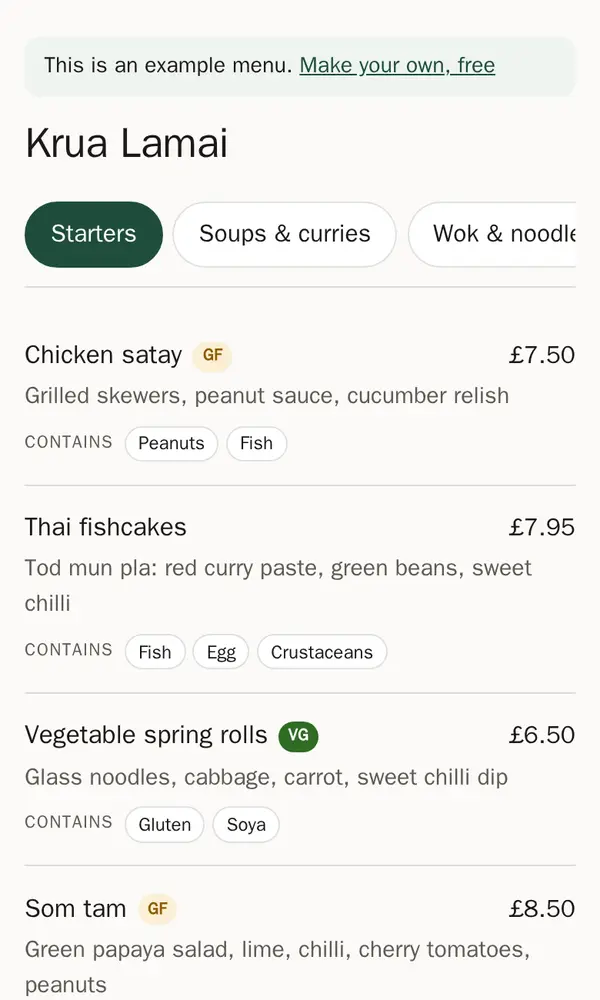
This is the menu of Krua Lamai, our demo Thai restaurant (it isn't a real place). Open it on your phone: your menu page would look like this, with your dishes.
Open the example menuWe build websites for restaurants: designed for you, with online bookings and this same menu editor, for £79 a month with everything included. That is how we earn our living.
The free menu is how restaurants get to know us. Every menu page carries a small "Menu by OhkaStudio" line, and if you ever want a website with bookings, we're here. If you never do, your menu stays free. There is no paid menu plan and nothing to upgrade to.
Something else you'd like to know? Email us at support@ohkastudio.com and you'll have an answer within one working day.
Yes. There is no card to enter, no trial period and no paid menu plan. You sign up with your restaurant's name and an email address, and the menu page and its QR code are free for as long as we run the tool.
We build restaurant websites with online bookings for £79 a month, and the free menu is how restaurants get to know us. Every menu page says "Menu by OhkaStudio" at the bottom, with a link to us. That is all: there is nothing to upgrade to, and we only email you tips and offers if you tick the box when you sign up.
No. The code only holds the address of your menu page, and that address stays the same. Change a dish or a price and the page updates within a few minutes; the code on your tables keeps working.
There is no limit on scans or views, and the code doesn't expire. A menu can hold up to 300 dishes in up to 40 sections.
Yes. You can mark any of the 14 allergens that UK and EU food law list on each dish, and tag dishes as vegetarian, vegan or gluten free. The page shows what you enter, so you are responsible for it being right and up to date.
Photos, yes: add one to any dish once you've confirmed your email (up to 60), and each is shown as a square of the same size. Ordering and payment at the table are not part of it.
No. They point their phone's camera at the code and the menu opens in their browser. Menu pages set no cookies and show no cookie banner.
Yes, restaurants anywhere can sign up. Prices can be shown in pounds, euros or US dollars, or in your own currency: you type its symbol or code, such as kr or AED. The editor is in English, and you can type your menu in any language.
An email address and your menu. After you sign up we email you a link to choose a password; the link works for 7 days. Your menu page goes live once you have added your first dishes.
Email support@ohkastudio.com from the address you signed up with and we will delete your menu, its page and your account.
Then we would be glad to build it. Our service is a website designed for your restaurant, with online bookings and the same menu editor, for £79 a month or £790 a year with everything included and no setup fee. We design your homepage for free first, so you can see it before you decide.
Sign up, type your menu, print your code. Free, with no card.
Need a website as well? We design, build and look after restaurant websites with online bookings: £79 a month, everything included, no setup fee. We design your homepage for free first. See the full service